Absences can only be activated by REΛLVIEW. For further information, please contact support at 044 512 18 00 or support@realview.ch.
Absences (vacation, military service, etc.) can be recorded and displayed either via the invitation email or directly in the app.
Once the function has been activated by REΛLVIEW, users can invite the email address realview.protokollapp@gmail.com when entering their absences in the calendar, so that the absences are automatically transferred to the tool.
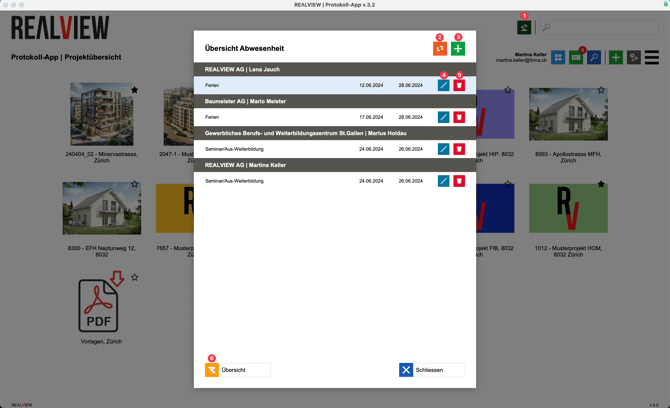
The project overview now features a palm tree icon (1) where absences can be viewed. If there are any missing absences that were sent via the calendar to realview.protokollapp@gmail.com, the list can be updated (2).
An absence can be created manually using the green plus sign (3). First, select the start date and then the end date of the absence. You can also enter the reason for the absence and the email address of a substitute.
The pencil icon (4) edits an entry. The trash can (5) deletes an absence.
The overview (6) allows you to view all absences on a timeline.
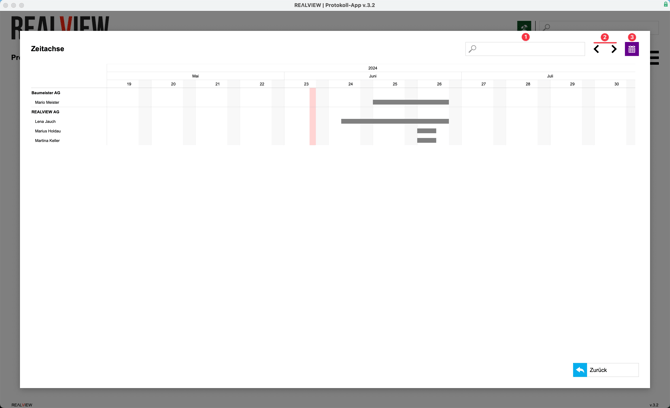
You can search for people or companies using the search field (1).
Use the arrow keys (2) to move or select the timeline. You can also use the calendar icon (3) to select the time period you want to view. You can choose from periods of 3, 6, 9, 12, 18, and 24 months.
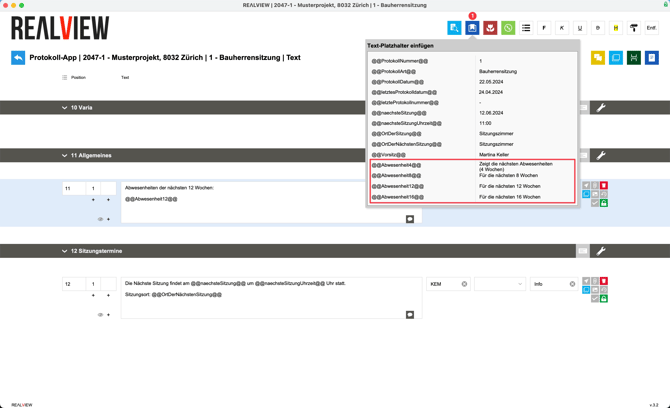
You can select the desired text entry and use the placeholder (1) to insert the desired duration of the absences. The placeholder displays the absences for the desired number of weeks from the meeting date.