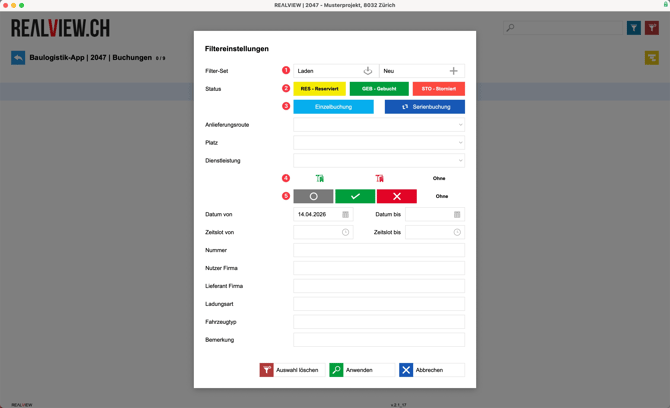
You can use the filter (1) to restrict the bookings displayed or reset to the default filter (2). An admin or project manager can set for each project whether future bookings or all bookings should be displayed by default.
Bookings are marked with the following three status colors:
- RES: The booking has been requested but not yet confirmed
- GEB: The booking has been confirmed
- STO: The booking has been cancelled
You now have the option to adjust the status (3) for individual bookings. You can confirm, postpone or cancel the booking. As soon as a booking has been confirmed, cancelled or postponed, the supplier will be notified by email.
You can create an Excel export (4) of all displayed bookings or switch to the Gantt view (5).

Filtering
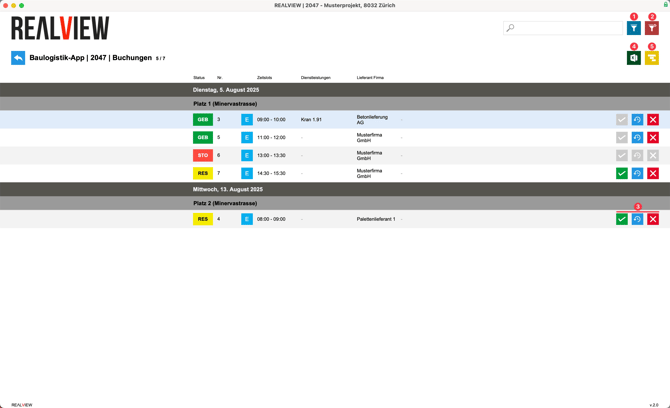
If you have set up a filter that you use occasionally, you can save or load using the filter set (1).
Under Status (2) and Posting Types (3), you can display the desired statuses or posting types (single or batch posting). If you do not want a status or booking type to be displayed, you can deselect it.
For services, you have the option to filter by the person who created the entry (4) and the approvals by the responsible person (5).
Any fields displayed in gray will not be shown in the filter results.