Whenever a new update is scheduled, you will be informed in advance by email about when the update will take place and what new features or improvements it will include. During the update, there may be a short interruption of approximately 30 to 90 minutes.
Important: If the update affects offline files, you will be informed about the necessary steps.
Update Offline File | Required Steps
If you use an offline version on your iPad or iPhone, an update and backup of your offline file will be created automatically during the first synchronization after the online system has been updated. Before performing the first synchronization, please make sure that your device has at least as much free storage space as your current offline files are using.
Example: If your offline files currently use 21,000 MB (21 GB), you will need at least the same amount of free storage space available on your device.
A step-by-step video guide can be found here: Video-Guide
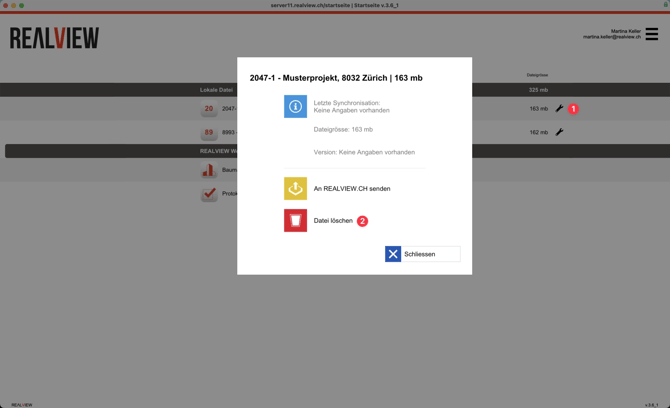
If your device does not have enough available storage space, you can delete the file via the wrench icon (1) and then select Delete File (2) after synchronizing. Once the update is complete, you can download a new offline file from your project.
WARNING: A deleted offline file CANNOT be recovered!